To issue electronic rental receipts, it is necessary to immediately communicate the relevant contract (lease, sublease and promise to lease) to the Revenue and Customs Agency (AT), by submitting the Model 2 declaration, by the end of the month following its start.
As a rule, the contract must be communicated online, on the landlord’s personal rental page, on the Financial Portal. An exception is made for owners over the age of 65 or who receive a rent amount less than double the Social Support Index (IAS) per year, the equivalent of 960.86 euros, in 2023, and who, at the same time, do not have or are obliged to have an email inbox. These owners can submit the Model 2 declaration to a financial service. But if you prefer, you can do it electronically, like other owners.
It is also mandatory to communicate any changes to the contract and its termination. If there are more than one lessors, it is sufficient for only one to communicate the contract, with the identification of the remaining lessors.
Notification of the contract constitutes a tax obligation under stamp duty, therefore after the submission of the Form 2 return a collection note is issued for the payment of this tax, if applicable.
Issue electronic rent receipts
Once the contract has been communicated, the landlord can – and must – issue the respective rental receipts. The issuing of the so-called electronic rent receipts must take place electronically, on the landlord’s personal rental page, on the Financial Portal.
In addition to the rent itself, the landlord must also issue electronic rent receipts for the amounts received at the time of signing the contract, such as the monthly deposit. The rent receipts issued by the landlord can then be consulted on the tenant’s personal rental page, on the Financial Portal.
Who gets fired
Also in this case there are exclusions to the obligation to issue electronic rent receipts. Landlords who fall into at least one of these cases are therefore exempt from this obligation:
They are over 65 years old
They receive an amount of income less than double the annual IAS, equal to 960.86 euros and, cumulatively, they do not own nor are required to have an email address;
Receive rent from contracts covered by the Rural Rental Scheme.
Landlords receiving rent from contracts covered by the Rural Rental Scheme also benefit from this exemption. Landlords exempt from issuing electronic rent receipts must submit the Form 44 declaration to the TA by the end of January each year. From 2023, delivery will have to be made online.
This declaration must contain the amounts of rent received from tenants in the previous year. Information relating to contracts, properties and tenants, among other data, must also be included.
However, if they wish, these landlords can choose to issue electronic rent receipts. But if they do it once, from then on they have to do it that way.
How is the receipt issued?
Electronic rent receipts are settlement documents and therefore should only be issued after rent has been paid. Therefore, if the tenant does not pay rent in a given month, the landlord is not required to issue a receipt. In order for landlords to protect themselves from tenant default, there are rental insurance policies in place. Tranquilidade Rent Protection Insurance, for example, guarantees payment of the rent due for a period of between four and six months.
To issue electronic rent receipts you must comply with the following: the following steps:
1. Log in to the Financial Portal
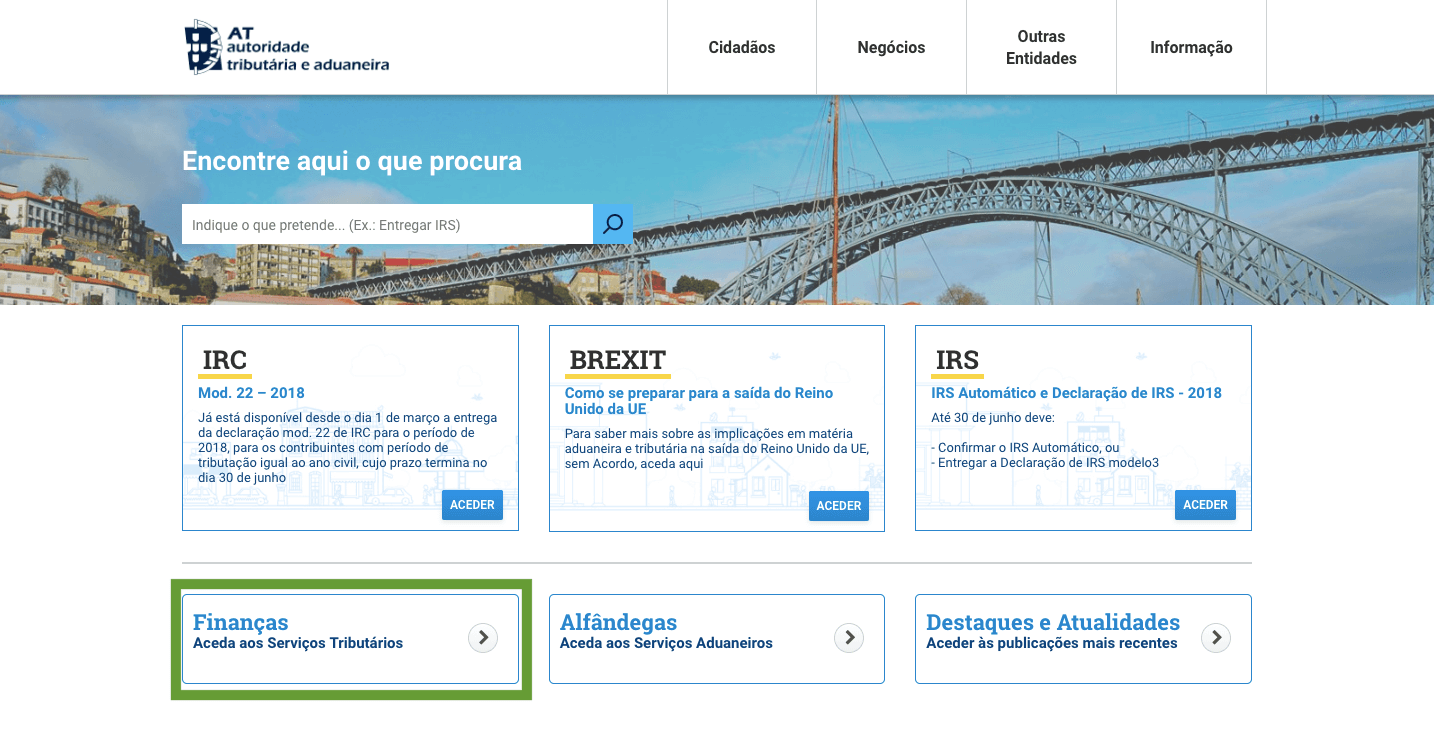
2. Click on the «Finance» option.
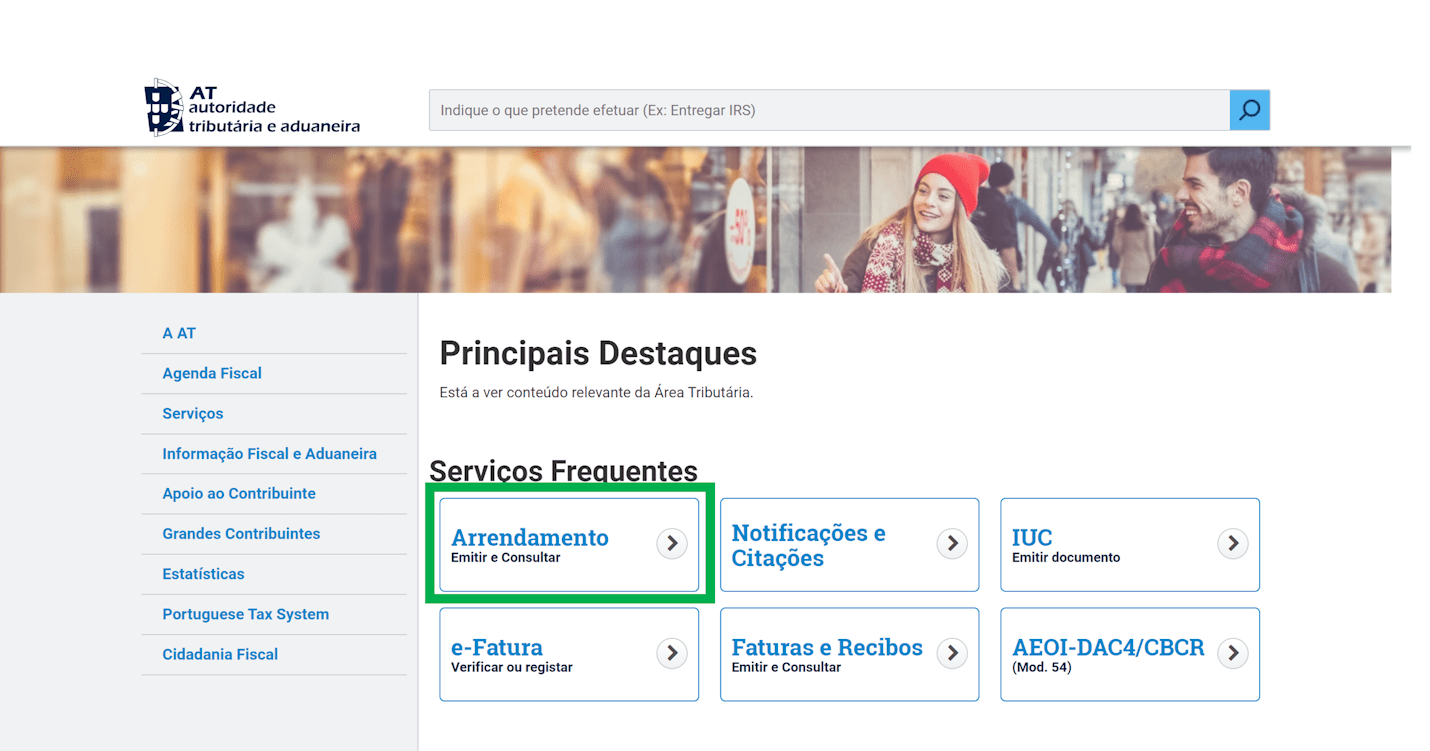
3. Choose the «Location» option.
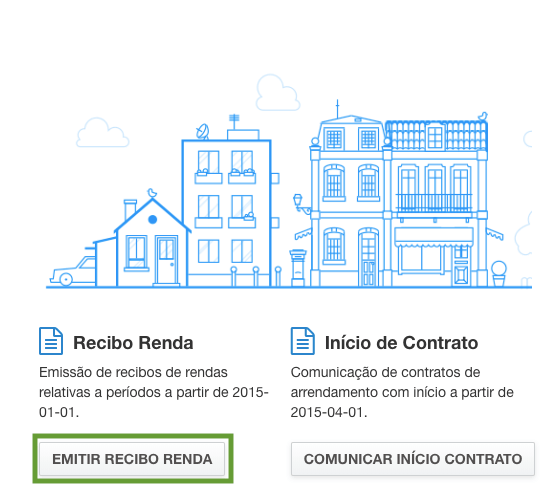
4. Click on the “Issue Income Receipt” option.
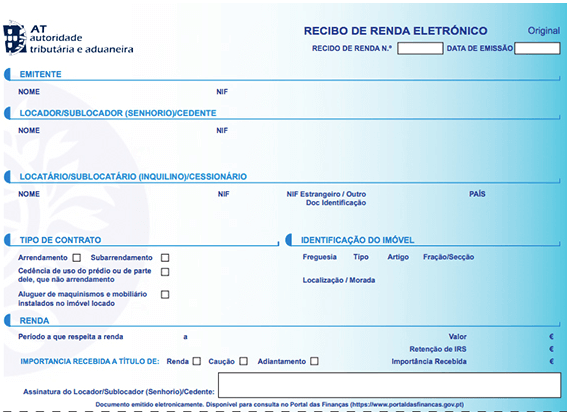
5. Choose the contract for which you want to issue a receipt.
6. Fill out the receipt. The name of the lessor or of the person authorized by him to do so on his behalf must be reported in the «Issuer» field.
If it is a contract where the tenant is a displaced student, the owner must indicate this situation in the «Additional information» field.
How to cancel the receipt?
It is possible to cancel electronic rent receipts already issued. However, such cancellation must be made by the issuer by the end of the IRS return deadline for the year to which the income in question relates.
We use cookies to ensure that we give you the best experience on our website. If you continue to use this site, we will assume that you are happy with this.